Booking apps for salons and service businesses are everywhere. Vagaro, Booksy, Fresha, Square Appointments, Acuity — each one with its own pricing, learning curve, and yet-another-app-to-install for clients. The combined market spends close to a billion dollars a year on appointment software, and the small salon down the street is paying $30-60 a month for software her clients half-ignore.
The problem isn't really booking. The problem is that booking lives in a different place than where clients actually communicate. People text the salon. They DM on Instagram. They send a Telegram message asking "any spots tomorrow?" And the salon owner manually copies that conversation into Vagaro because that's where the schedule lives.
This is the case for a different approach: an appointment booking bot that lives where conversations already happen — in Telegram. Not as a replacement for full salon management software, but as a structured intake layer that captures booking requests properly without forcing clients into a separate app.
Why traditional booking software falls short for small salons
Three patterns keep showing up when small salons evaluate booking software:
The cost-to-benefit math doesn't work below a certain size. A solo nail tech doing 25 appointments a week pays the same Vagaro subscription as a salon with 5 stylists. The marginal benefit of advanced features (resource scheduling, multi-staff calendars, package management) is zero when there's only one person doing the work.
The client experience is bad on mobile web. Most booking widgets are designed for desktop. On a phone, the calendar is squished, the time slots are tiny, and the client gives up after two confused taps. Industry data suggests booking abandonment on mobile is 40-60% — meaning more than half of people who click "Book Now" never finish.

It adds friction for clients who already know where to find you. If your client base is on Telegram (common in Eastern Europe, Middle East, parts of Asia), asking them to download a separate app or visit a booking page is a step backward. They have to leave the place where they normally communicate with you.
What a Telegram booking bot actually does
A booking bot in Telegram is a structured form that walks a client through scheduling an appointment, captures all the details a salon needs, and sends the request to the admin's queue for confirmation. The flow looks like this:
Client opens the bot link from your Instagram, website, or business card
Bot asks: which service (buttons), preferred date, preferred time slot, name, phone, any special notes
Client fills it in — total time, about 60 seconds
Request lands in the salon's admin queue
Admin reviews, calls back to confirm or reschedule, and the appointment is locked in
You can test this exact flow live: @SalonRequestDemoBot — the demo we run for showing how salon booking works in Telegram. Same fields, same flow, same admin experience.
The bot doesn't replace the salon's calendar. The owner still uses Google Calendar, a paper appointment book, or Vagaro for the actual schedule. The bot replaces the chaotic intake — the DMs, the missed messages, the "what time is good for you?" back-and-forth.
When a Telegram booking bot is the right fit
This approach works best in specific scenarios:
Solo practitioners and small teams. One person doing the work or a small team where the owner handles intake personally. The bot saves the time normally spent typing repetitive questions.
Clients who already use Telegram heavily. If 80%+ of your clients communicate with you on Telegram already, the booking bot is a natural extension. If your clients are on Facebook Messenger or only call by phone, this isn't the fit.
Service businesses with simple scheduling. Hair salons, nail studios, massage therapists, barbers, eyebrow studios, lash specialists, makeup artists, mobile cleaning services, dog grooming, fitness trainers, tutors. Anything where the booking is "client picks a service, picks a time, you confirm."
Businesses on a tight budget. The total cost of a Telegram booking bot setup is dramatically lower than $30-60 a month for traditional booking software. For a solo nail tech earning $3,000/month, saving $60/month is a real number.
What it doesn't replace
Honest about limits — a Telegram booking bot is not a full salon management system. It doesn't handle:
Real-time calendar with conflict detection
Resource and staff scheduling for multi-stylist salons
Inventory management or product sales
Detailed client history and notes
Payment processing for deposits or full payment
Marketing automation and email reminders
If you need any of those, you need Vagaro, Booksy, Fresha, or similar. The booking bot is for the smaller use case — capturing the request properly, eliminating the chaos at the front of the funnel.
The intake fields that matter
A booking bot is only useful if it asks the right questions. After looking at how successful service-business intake forms work, the fields that consistently matter:
Field | Type | Why it matters |
|---|---|---|
Service | Buttons (preset options) | Different services need different time slots and pricing |
Preferred date | Text or date picker | Sets the conversation around timing |
Preferred time | Buttons (Morning / Afternoon / Evening) | Coarse buckets work better than exact times for first contact |
Special notes | Optional text | "My hair is below shoulder length" — saves time during the appointment |
Full name | Required text | For the calendar entry and client record |
Phone | Required (phone format) | Confirmation calls or SMS reminders |
Six fields, about 60 seconds to fill. Don't add more unless absolutely necessary — every additional field drops completion by 5-10%.
How clients find the booking bot
The bot link is just a Telegram URL — `t.me/yoursalonbot`. You distribute it the same way you distribute any contact info:
Instagram bio — primary CTA "Book in Telegram →"
Instagram stories — periodic reminders with the link
Google My Business — booking link field
Website — replace the existing "Book" button or run them in parallel
Business cards — QR code that opens the bot directly
SMS to existing clients — one-time announcement: "We've made booking easier — DM our bot"
WhatsApp Business profile — for clients on multiple platforms
The advantage of Telegram links: they work on every device, no login required for the client (they already have Telegram), and the click-to-book flow is significantly shorter than a website booking page.
Example: how a salon adopts this
Picture a small hair salon — owner plus one stylist, about 100 appointments a month between them. Before adopting a booking bot, the intake looks like this:
30 Instagram DMs per week asking "any spots Saturday?"
Owner manually responds, suggests times, copies confirmed appointments to a paper book
About 20% of conversations stall — client never confirms, owner never follows up
Calendar errors happen weekly because the owner forgets to write something down
After: the salon shares the booking bot link in Instagram bio and stories. Clients open the bot, fill in the 6 fields, and the request lands in the salon's admin queue with everything the owner needs. The owner spends 15 seconds reviewing each request and either confirms or proposes a different time.
Net effect:
Time spent on intake drops from ~2 hours/week to ~15 minutes
Stalled conversations drop because the bot captures the full request upfront
Calendar errors drop because every booking has structured data, not chat fragments
Client experience improves because there's no back-and-forth
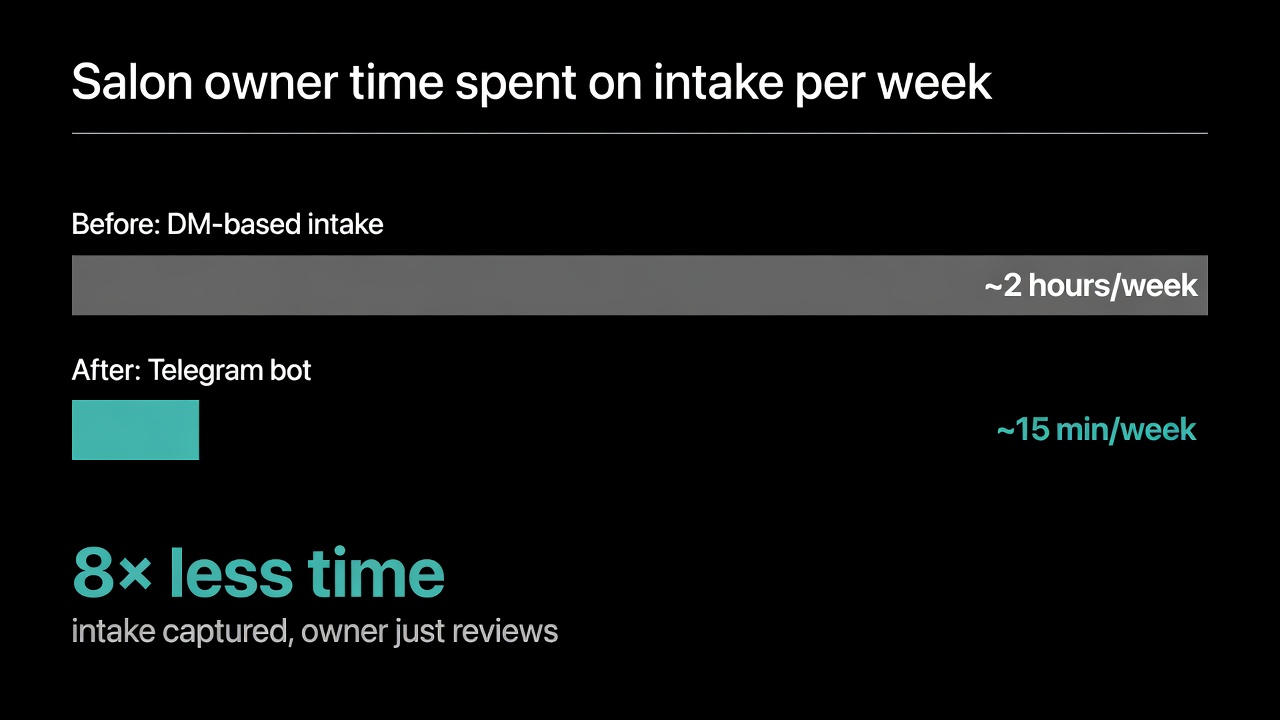
This isn't hypothetical — it's the standard pattern for service businesses that switch from DM-based intake to structured forms. Whether the structured form lives in Vagaro, Calendly, or a Telegram bot is a tradeoff between cost, features, and where the client base already is.
How to set up an appointment booking bot
Quick demo of the full Easy Post workflow — bot form intake, moderation queue, and routing to channels, CRM, or spreadsheets:
The setup process for a Telegram booking bot using a no-code platform:
Step 1. Create a project on Easy Post. Free tier with shared bot — no BotFather setup needed for the first version.
Step 2. Pick the appointment booking template. Field set is pre-configured for service businesses (service, date, time, name, phone, notes). Customize service options to match your menu.
Step 3. Set up the intake settings — welcome message, what happens after the client submits ("We'll call you back to confirm within 30 minutes"), daily submission limits if you need them.
Step 4. Get the bot link. Share it on Instagram, Google My Business, your website, business cards. Each booking request lands in the admin queue.
Step 5. Optional — set up Google Sheets webhook so all booking requests flow into a spreadsheet automatically. This is useful if you want a backup record or if the owner reviews bookings on a laptop instead of phone.
The whole setup takes about 15 minutes for a first-time user.
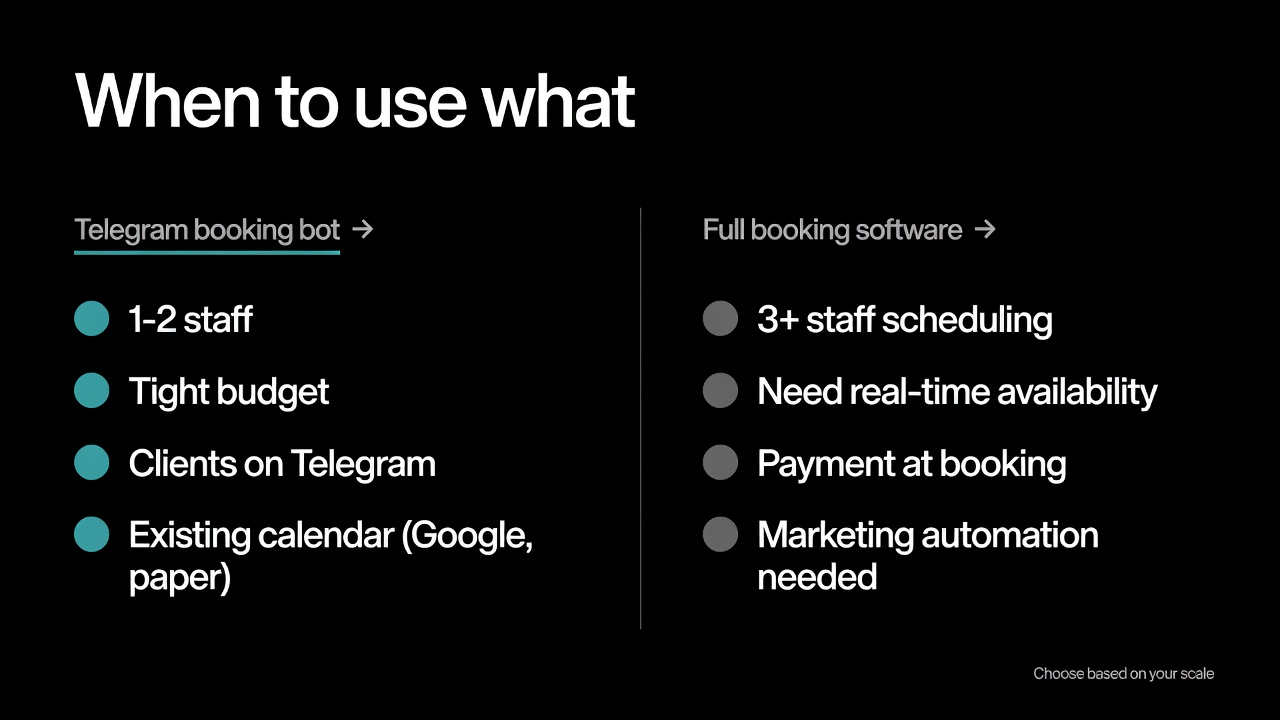
Booking bot vs full booking software — a decision framework
If you have... | Use... |
|---|---|
1-2 staff, simple services, tight budget | Telegram booking bot |
3+ staff with overlapping schedules | Vagaro, Booksy, or Fresha |
Existing calendar (Google, paper) you don't want to replace | Telegram booking bot as intake layer |
Need real-time slot availability and self-service confirmation | Acuity, Calendly, or full salon software |
Client base predominantly on Telegram or Instagram | Telegram booking bot |
Client base predominantly desktop, scheduling weeks ahead | Web-based booking software |
Need payment collection at booking time | Square Appointments or similar |
Just want clients to stop DMing "any spots tomorrow?" | Telegram booking bot |
The two options aren't mutually exclusive. Some salons run a Telegram booking bot for first-touch intake and Vagaro for the actual calendar — the bot captures the request, the salon owner moves it into Vagaro. This split works when the bot is dramatically faster than Vagaro's mobile experience but the salon needs Vagaro's features for staff scheduling.
Use cases beyond hair salons
The same pattern works for any service business with appointment-based scheduling. Examples we've seen:
Nail studios — service selection (manicure, pedicure, gel, extensions), preferred date, time, name, phone
Barbershops — service (cut, beard trim, kids cut), preferred barber, preferred time, contact
Massage therapists — service type, duration, preferred date, special needs (pregnancy, injury, preferences)
Dental and medical offices — appointment type (cleaning, consultation, follow-up), urgency, insurance info, contact
Personal trainers — session type (strength, cardio, mobility), preferred location (gym, home, online), schedule
Mobile services — cleaning, dog grooming, mobile mechanics — service, location, preferred time, contact
Educational services — tutoring, music lessons — subject/instrument, current level, schedule, contact
For more on structured intake patterns and form design, see our guides on no-code form builders for Telegram and how Telegram bot forms work.
Frequently asked questions
Can I use a Telegram booking bot for free?
Yes. Easy Post offers a free tier with the shared bot, the appointment booking template, and basic admin queue. The free tier covers most solo practitioners and small salons. Branded bots and unlimited submissions require a paid plan.
How is this different from Calendly or Acuity?
Calendly and Acuity are calendar-driven — clients see your real availability and pick a slot. A Telegram booking bot is request-driven — clients submit a preferred time, you confirm or propose alternatives. Calendly is better for self-service scheduling. The booking bot is better when you want manual control over which appointments get accepted.
Can clients pay through the booking bot?
Telegram supports native payments through Telegram Stars and integrated providers. Easy Post supports collecting deposits or full payment at booking time, but this is most useful for fully-confirmed appointments. For service businesses, deposit collection often happens after the salon confirms availability.
What happens if I get more bookings than I can handle?
Set a daily submission limit in the bot settings. Once reached, new clients see a message like "Fully booked for today — try tomorrow." This avoids the awkward situation of accepting requests you can't fulfill.
Where to start
If you're a solo practitioner or run a small salon, set up a booking bot in 15 minutes and use it in parallel with your current intake for a week. Compare: how many bookings came through the bot vs DMs, how much time you spent on intake, what the client feedback was. If it works, gradually move all intake to the bot. If it doesn't fit, you've lost 15 minutes.
For larger operations or businesses that need real-time calendar features, this isn't the right tool — pick Vagaro, Fresha, or Booksy. But for the long tail of small service businesses where the calendar is simple but the intake is chaotic, a Telegram booking bot solves the actual problem.