Marketing agencies, dev shops, design studios, and consulting firms all share one operational pain: the inbound lead process is a mess. A potential client emails saying they need help. The agency replies asking for budget. The client replies. The agency asks for timeline. The client doesn't reply for three days. Two weeks later, the deal is dead.
The fix isn't more aggressive follow-up or a bigger CRM. It's a structured client intake form that captures everything the agency needs upfront — company, task, budget, timeline, contact — in a single 60-second flow. Better data at the front of the funnel means more deals closing at the back.
This guide covers how client intake forms actually work in 2026, why traditional contact forms underperform, and how to set one up in Telegram for agencies whose clients communicate there. With realistic numbers and concrete templates instead of generic advice.
What a client intake form is — and isn't
A client intake form is the first structured conversation between a potential client and your agency. It collects the information you need to evaluate the lead, scope the project, and decide whether to invest sales time on a follow-up call.
It's not the same as a contact form. A contact form says "send us a message and we'll get back to you." That's it. The agency receives unstructured text — sometimes complete, often missing key details. The intake form turns that vague request into structured data: company name, task description, budget range, timeline expectations, contact details.
It's also not the same as a sales call form. Sales calls are deeper — they explore goals, objections, decision-makers, success metrics. The intake form is the layer before the call: enough information to decide whether the call is worth scheduling.
Why agency contact forms underperform
Three patterns kill conversion on traditional agency contact forms:
The form asks too much, too soon. Agencies often try to qualify hard at the first touch — 12 fields, mandatory budget brackets, project description with 200-character minimum. Cold prospects bounce. The form filters too aggressively for "high-intent leads" and ends up with very few leads at all.
The form asks too little, too generically. The opposite mistake. "Name, email, message" — the agency receives 30 messages a week saying "Hi, I'd like to discuss a project, please call me." Zero structured data. Every conversation starts from scratch.
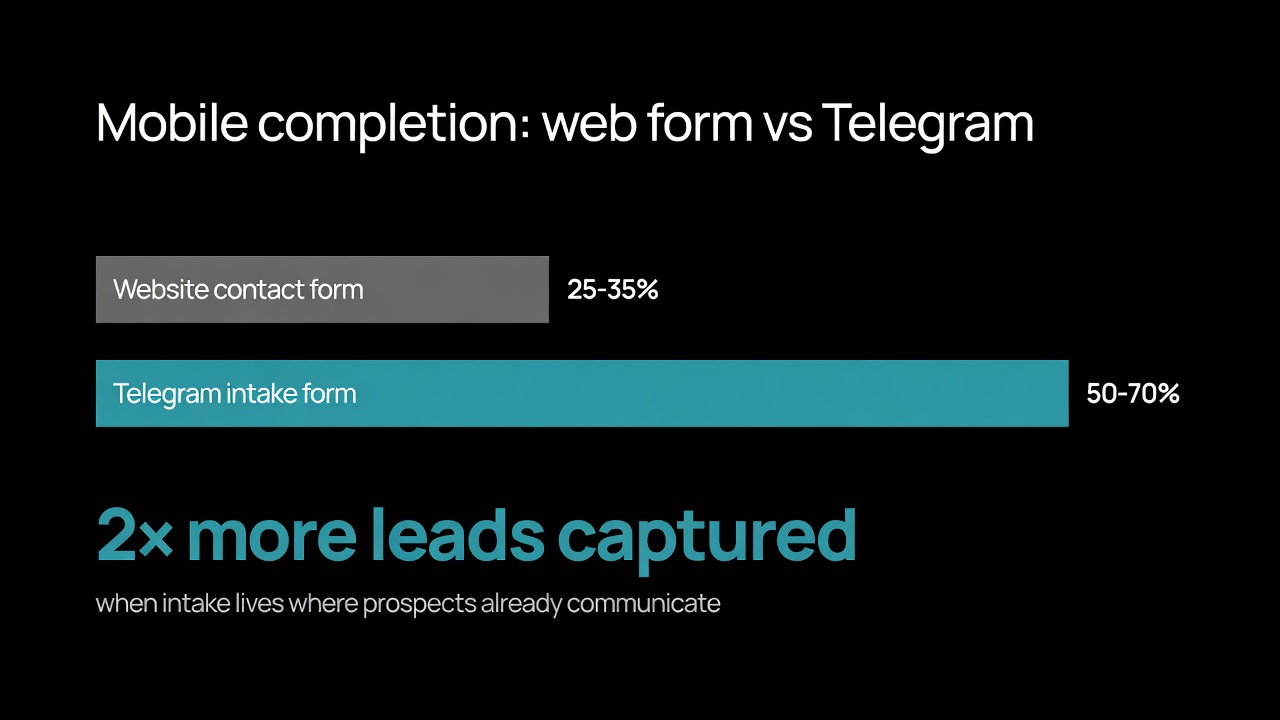
The form lives in the wrong place. A contact form on a website forces the prospect to leave wherever they discovered the agency (LinkedIn post, Telegram referral, email signature) and complete a separate web flow. Mobile completion drops to 25-35%. For agencies whose clients communicate in messaging apps, this friction is significant.
The right intake form is somewhere between "everything we need" and "as little as possible." Five to seven fields, no more. Mostly buttons, minimal typing. And ideally it lives in the channel where prospects already communicate.
The 4 fields that matter for agency intake

After looking at how successful agency intake forms perform in practice, four fields consistently drive conversion to qualified calls:
Field | Type | Why it matters |
|---|---|---|
Company | Required text | Differentiates B2B from individual inquiries; enables LinkedIn research before the call |
Task description | Required text (10-1000 chars) | The actual scope. Length range filters out one-liners and rambling essays. |
Budget range | Buttons (preset brackets) | The single biggest qualifier. Brackets feel less invasive than asking for an exact number. |
Timeline | Optional text | "ASAP" vs "Q3" tells you whether to fast-track the response or queue it. |
The implementation matters as much as the fields. Make budget a button selection (`<$1K`, `$1K-$5K`, `$5K-$20K`, `$20K+`) instead of an open field — prospects who'd skip an exact-budget question are willing to tap a bracket. Make timeline optional with a "Flexible" skip option — adding required pressure here pushes leads to lie ("ASAP") rather than disqualify themselves.
Why budget brackets work better than open fields
The budget question is the crux of every intake form. Asked badly, it kills the conversion. Asked well, it's the single most useful piece of qualifying data the agency gets.
Open budget fields ("What's your budget?") create three problems:
Prospects without a defined budget skip or lie
Cost-conscious prospects undershoot to negotiate
Prospects feel pressured to commit before learning what's possible
Bracketed budgets ("Less than $1K", "$1K-$5K", "$5K-$20K", "$20K+") solve all three. The prospect picks a range without committing to a number. The agency knows roughly what tier the lead is. And the question feels like a filter (helping match scope) rather than an interrogation.
The brackets you pick depend on your agency's pricing tier. A small marketing agency might use `$500-$2K, $2K-$10K, $10K-$50K, $50K+`. An enterprise consultancy might use `$10K-$50K, $50K-$250K, $250K-$1M, $1M+`. Match the brackets to your real ICP.
What an intake form looks like in Telegram
For agencies whose audience uses Telegram — common in B2B services in CIS, parts of Europe, Middle East, crypto/Web3 sector — running the intake form inside Telegram itself solves the "form lives in the wrong place" problem.
The flow takes about 60 seconds:
Prospect clicks the bot link from your LinkedIn, email signature, or pitch deck
Bot greets them with the agency name and a "Start" button
Bot asks for company name (text input)
Bot asks to describe the task (text, 10-1000 characters)
Bot offers budget bracket options as buttons
Bot asks for timeline, with a "Flexible" skip option
Bot confirms the submission and tells them next steps ("We'll review and get back within 24 hours")
You can see this exact flow live: @AgencyLeadsDemoBot — the demo we run for showing how agency intake works in Telegram.
The submission lands in the agency's admin queue. Reviewer sees the structured data, decides whether to schedule a call, and either approves (triggering a follow-up email or CRM lead creation) or rejects (with optional auto-response to the prospect).
The follow-up data flow
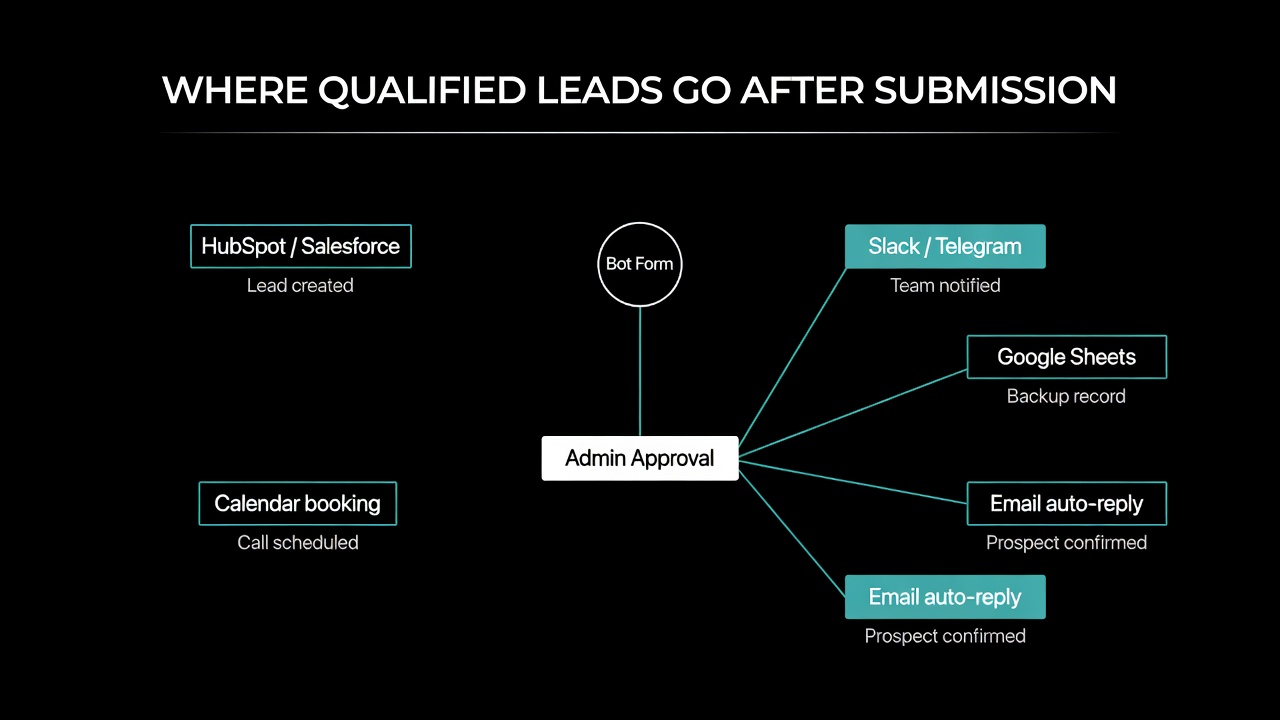
Capturing the lead is half the work. What happens after submission is the other half:
Routing to CRM. Agencies running HubSpot, Salesforce, Pipedrive, or Zoho should have approved leads land directly in the right pipeline as a new contact with all four fields filled in. No copying, no re-typing. The CRM webhook handles this automatically.
Slack or Telegram team notification. Sales team sees new qualified leads in their work channel within seconds of submission. Especially valuable for high-intent leads (large budget bracket, specific timeline) that need fast follow-up.
Backup to Google Sheets. Even with CRM in place, a parallel feed to a spreadsheet provides a flat view all team members can analyze, sort, and filter. Useful for monthly lead reviews or ad hoc queries.
Email auto-reply. The prospect gets an immediate confirmation: "Thanks, we'll review and respond within 24 hours." Sets expectations and reduces the "did they get my message?" follow-ups.
This routing layer is what turns a structured intake form from a lead capture tool into an actual sales operations system. We've covered the routing patterns in more detail in our guide on automated workflows for inbound submissions.
Inbound vs outbound — where intake forms fit
"Inbound" and "outbound" are sometimes used interchangeably, but they're different motions for an agency:
Outbound leads come from the agency's prospecting — cold email, LinkedIn outreach, paid ads. The agency knows who they're talking to, often has the prospect's full context, and the conversation usually starts with the salesperson reaching out. Intake forms are less critical here because the salesperson is doing the qualifying.
Inbound leads come from the prospect's interest — they found the agency through content, referral, search, or word of mouth. The agency knows nothing about them until they reach out. This is where the intake form earns its keep — it's the first structured interaction, and it determines whether the lead becomes a real opportunity.
Most agencies have both motions. Outbound generates pipeline; inbound generates surprises (often the highest-margin deals because the prospect found you, not the other way around). The intake form mostly improves inbound — but it also speeds up outbound by giving prospects a self-service way to confirm interest after a sales conversation.
How to set up a client intake form in Telegram
The setup process for a Telegram-based intake form using a no-code platform:
Step 1. Create a project on Easy Post. Free tier with shared bot — no BotFather setup needed for the first version.
Step 2. Pick the agency intake template. Field set is pre-configured (company, task, budget brackets, timeline). Customize budget brackets to match your pricing tier.
Step 3. Set up the messaging. Welcome text introduces your agency briefly. Confirmation text manages expectations ("We respond within 24 hours during business days").
Step 4. Set up the routing. Connect a CRM webhook (HubSpot, Salesforce, Pipedrive, Zoho), Google Sheets backup, and Slack notifications for the sales team. All optional, but together they remove manual data entry.
Step 5. Get the bot link and add it to your touchpoints. LinkedIn bio, email signature, pitch deck, website CTA, calendar booking pages, sales follow-up emails. Each surface where prospects encounter your agency should point to the bot.
Total setup time: about 20 minutes for a first-time user.
Quick demo of the full Easy Post workflow — bot form intake, moderation queue, and routing to channels, CRM, or spreadsheets:
How to drive prospects to the intake form
The bot link is a Telegram URL — `t.me/youragencybot`. It's just a URL, distributable anywhere prospects discover the agency:
LinkedIn profile bio — primary CTA "Start a project →"
LinkedIn posts — concrete CTAs at the end of case studies and thought leadership posts
Email signature — "Considering a project? Quick intake →"
Pitch deck final slide — replace the generic "contact us" with the bot link
Website CTAs — "Book a project" or "Get started" buttons
Calendar landing page — pre-call form that captures context before the meeting
Sales follow-up emails — "When you're ready, here's a quick form to share project details"
Conference booth materials — QR code that opens the bot directly
The advantage of Telegram: prospects in regions where Telegram is dominant (Eastern Europe, Middle East, parts of Asia, crypto/Web3) get a frictionless flow. Prospects on other platforms get a similar experience as long as Telegram is installed — which it usually is for B2B audiences.
Use cases beyond marketing agencies
The same client intake pattern works across professional services:
Marketing and creative agencies — company, project type, budget, timeline, deliverables expected
Development shops — project type (web, mobile, integration), tech stack preferences, budget, timeline, current solution
Design studios — project type (brand, web, product), scope (full system, redesign, audit), budget, timeline
Consulting firms — area of focus, current state, desired outcome, budget, decision timeline
Recruiting agencies — company size, role to fill, salary range, timeline, current candidates considered
Legal services — practice area, urgency, budget bracket, jurisdiction, current legal counsel
Architecture and design firms — project type (residential, commercial, renovation), location, budget, timeline
Financial services — service needed (accounting, tax, advisory), business stage, current setup, timeline
The fields shift but the pattern is the same: 4-6 structured questions, mostly buttons for ranges and types, free text only where it matters (the actual problem description). For more on form design patterns, see our guides on no-code form builders for Telegram and how Telegram bot forms work.
Common mistakes that kill intake conversion
Asking for everything upfront. The intake form is not the discovery call. It's the gate to the discovery call. Five fields, maximum six. Save deeper questions for the actual conversation.
Not having a clear next step. Submission ends with "Thanks." Bad. Submission should end with a specific commitment: "We'll review and respond within X hours." Sets expectations and prevents the prospect from messaging again wondering whether you got it.
Treating low-budget prospects as noise. Some agencies set up forms that aggressively filter out anything below their target budget. Sometimes correct. Often a mistake — low-budget prospects today are larger budgets in 12 months. A polite "we focus on $X+ engagements" leaves the door open.
Skipping the moderation queue. Auto-routing every submission to a sales rep generates noise, missed responses, and qualified leads that fall through cracks. Even a 30-second human review before the lead enters the CRM dramatically improves response rates.
Generic confirmation message. "Thanks for your message" is forgettable. "Thanks — we'll review your project today and respond by [tomorrow morning] with next steps" sets expectations and feels professional.
Frequently asked questions
Can I use a Telegram client intake form for free?
Yes. Easy Post offers a free tier with the shared bot, the agency intake template, basic admin queue, and one webhook destination. Most small agencies can run their inbound process on the free tier. Branded bots, multiple webhook destinations, and unlimited submissions require a paid plan.
How is this different from Typeform or HubSpot forms?
Typeform and HubSpot forms live on a website. Prospects have to leave wherever they discovered you and complete a web flow on their device's browser. A Telegram intake form lives inside Telegram — for prospects already on Telegram, there's no platform switch. Mobile completion is typically 50-70% in Telegram versus 25-35% in web forms. The tradeoff: prospects not on Telegram have to install it, which is a barrier in some markets.
How do I integrate the intake form with HubSpot or Salesforce?
Use a webhook from the intake platform to your CRM. Both HubSpot and Salesforce support inbound webhooks for creating contacts, deals, or leads. When the agency approves a submission, the platform fires a webhook with structured data — company, task, budget bracket, timeline, contact info. CRM creates the lead with custom fields filled in. No manual data entry.
What's the typical conversion rate from intake submission to qualified call?
Depends heavily on the source of traffic and how aggressively you filter. From warm sources (LinkedIn referrals, content readers), 40-60% of submissions become qualified calls. From cold sources (paid ads, conference leads), 15-25% is more realistic. The intake form raises this number compared to unstructured contact, but doesn't change the underlying lead quality.
Where to start
If your agency relies on inbound leads and the current intake is "email us at hello@" or a five-field WordPress contact form, switching to a structured intake form is one of the highest-ROI changes you can make. Setup takes 20 minutes. Output quality improves immediately. The first lead through the new form will already feel different from what you're used to.
For agencies with strong outbound motion, the intake form matters less for net new leads but still improves the post-call workflow — prospects share project details in a structured form before the second call, which means the second call starts at depth instead of clarification.
Whichever bucket you fit, the change is the same: more structured data at the front of the funnel means more closed deals at the back.