Field teams have one operational pattern that goes wrong every single day: the daily report. The construction crew foreman is supposed to log hours, materials, blockers, and progress at end of shift. The cleaning team is supposed to file location-by-location reports. The mobile mechanic is supposed to document what was done at each job. In theory, this data flows up to the office and informs payroll, billing, scheduling, and quality control.
In practice, the report comes in as a WhatsApp photo of a paper checklist with half the fields blank. Or as a phone call to dispatch with no written record. Or it doesn't come in at all because the worker forgot. The office spends Tuesday morning chasing Monday's reports.
The fix isn't more software. Most field teams have already tried Raken, Fieldwire, Assignar, ConnectTeam — and abandoned them because workers found the apps too heavy, the office found the subscription too expensive, or both. The fix is meeting workers where they already are. For a lot of field teams, that's Telegram.
This guide covers how a Telegram-based daily report bot works, why it solves the compliance problem that traditional field service software keeps hitting, and how to set one up in 15 minutes for your team. With realistic numbers and a working demo to test.
Why daily reports break in field operations
Three patterns kill compliance on traditional reporting:
Workers don't want to install another app. A typical site worker already has WhatsApp, Telegram, Instagram, the company's HR app, two banking apps, and a dispatching tool. Adding "the reporting app" makes 7. Compliance drops fast. Industry data on field service apps suggests less than 60% of crews actually file reports daily, even when management mandates it.
The desktop-first design fails on mobile. Most field service software was originally built for office managers viewing reports, not for workers filing them in 2 minutes between sites. Forms have 20+ fields. Calendar pickers don't work on cracked screens. Photo uploads time out on bad rural connections. The worker gives up and reverts to "I'll text the foreman later."
The pricing math doesn't work for small teams. Raken starts at around $40-60 per user per month. Fieldwire is similar. For a 10-person crew, that's $5,000-7,000 a year — for software that 4 of those 10 workers ignore anyway. Small contractors and service businesses skip the formal tools and use WhatsApp groups, paper checklists, or nothing.

The result: the office has incomplete, late, or missing data. Payroll has to chase hours. Billing has to chase materials. Project managers have to chase progress. The reporting friction shows up everywhere downstream.
What a Telegram daily report bot actually does
A daily report bot in Telegram is a structured form that walks a worker through their end-of-shift report in about 60-90 seconds. The flow:
Worker opens the bot link from the team's pinned message or a saved chat
Bot asks: which project (buttons), date, hours worked, tasks completed, blockers, materials used, photos
Worker fills it in — most fields are tap-to-select buttons, only the freeform text needs typing
Photos attach directly from camera or gallery
Report lands in the office admin queue with everything structured
Office reviews, exports to payroll/billing, or just keeps it for the project record
You can test the exact flow live: @ShiftReportDemo_bot — the demo we run for showing how field reporting works. Same fields, same flow as a production setup, real moderation queue.
What makes this work for field teams specifically: workers already have Telegram open. There's no new app to install, no login to remember, no "where did I save the link" problem. The report is one tap away from where they already chat with their crew.
Why Telegram works for field teams when other apps don't
Three structural reasons Telegram-based reporting hits compliance numbers other tools miss:
Native to the worker's existing workflow. Field teams in CIS, Eastern Europe, parts of South America, and increasingly Middle East default to Telegram for personal and group communication. Adding a reporting bot is "now Telegram does this thing too" rather than "now you have to use a new app."
Works on bad connections. Telegram is engineered to work on 2G, low signal, and unstable mobile networks. Construction sites, remote service calls, rural cleaning routes — all environments where Raken's photo upload silently fails. Telegram queues and retries automatically.
Familiar UI patterns. Workers know how to send messages, attach photos, tap buttons in Telegram. There's no learning curve. A 50-year-old electrician can file a report on day one. A 20-year-old apprentice doesn't even need instructions — the flow is obvious.
The 7 fields that matter for daily reports
After looking at how successful field reporting workflows work in practice, seven fields capture what payroll, billing, and project management actually need:
Field | Type | Why it matters |
|---|---|---|
Project / Site | Buttons (preset list) | Routes the report to the right project record. Buttons prevent typos in project codes. |
Date | Required text | Most reports cover today, but late filings need explicit date. Default to today, allow override. |
Hours worked | Required text | Direct input to payroll. Critical field, never optional. |
Tasks completed | Required text (10-1000 chars) | The actual work narrative. Length range filters out one-word entries and prevents copy-paste essays. |
Blockers | Optional text, with skip | Captures issues that affect schedule. Optional because most days have none. |
Materials used | Optional text, with skip | Direct input to billing. Quick text, optional skip for non-material days. |
Photos | Optional, max 5 photos | Visual record for billing disputes, before/after, quality control. |
Seven fields, about 60-90 seconds to fill. The optional + skip combination on three fields is what makes the form actually usable — workers don't get blocked by a field that doesn't apply to their day. They tap "skip" and move on.
What this replaces in practice
For a typical 10-person crew, here's what daily reporting looks like before and after a Telegram bot:
Before:
5 of 10 workers send WhatsApp photos of paper checklists at random times throughout the day
3 of 10 don't send anything; foreman reconstructs from memory at 6 PM
2 of 10 forget completely; office calls them Tuesday morning
Office spends 45 minutes Monday compiling, 30 minutes Tuesday chasing, 30 minutes Wednesday fixing payroll errors from missing/wrong data
Photos are scattered across WhatsApp threads with no searchable record
After:
9 of 10 file structured reports through the bot at end of shift
1 of 10 still forgets; foreman messages directly
Office spends 10 minutes reviewing the queue, batch-approves complete reports
Hours flow to payroll spreadsheet automatically via webhook
Photos attached to project record, searchable by date and worker
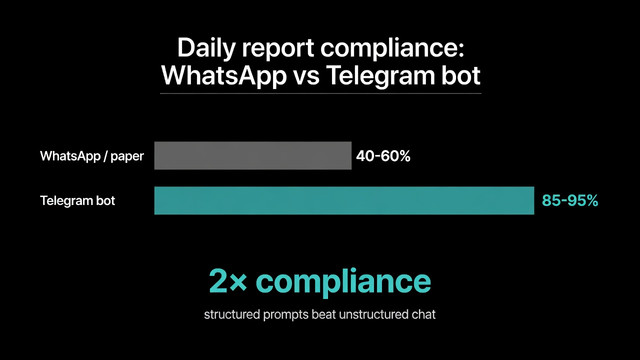
Compliance rate jumps from ~50% to 90%+ within the first month
The change isn't dramatic because the bot is magical — it's because the friction is lower. Compliance follows friction. Lower the friction below WhatsApp, you beat WhatsApp.
Where the data goes after submission
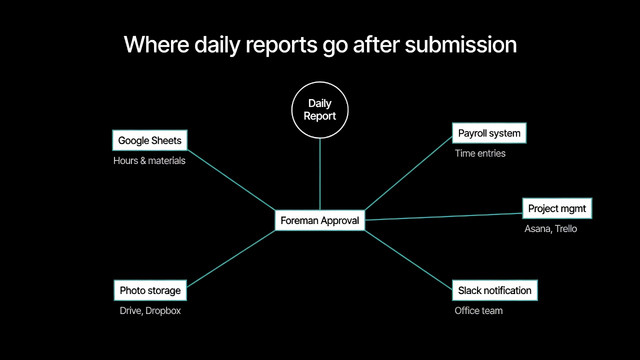
The reporting flow is only half the value. The other half is what happens to data after the report is filed:
Google Sheets sync. Each approved report appends to a master spreadsheet. Foreman opens Sheets and sees this week's hours by worker, materials used by project, photos linked by date. No manual data entry from the office.
Payroll system webhook. Hours field flows directly into payroll software (QuickBooks Payroll, Gusto, ADP, local equivalents). End of week, payroll runs without anyone typing hours twice.
Project management webhook. Asana, Trello, ClickUp, or Linear get a comment on the project card with today's update. Project managers see progress without chasing reports.
Slack/Telegram notifications. Office team channel gets a notification for each approved report. Daily status updates without daily standup meetings.
Photo storage. Photos archive automatically to Google Drive or Dropbox by project folder. No more scrolling through 500 WhatsApp photos to find the one that proves the work was done.
The webhook layer is what turns daily reporting from a compliance task into actual operational data flow. We've covered the routing patterns in more detail in our guide on automated workflows for inbound submissions.
How to set up a daily report bot in Telegram
The setup process for a Telegram daily report bot using a no-code platform:
Step 1. Create a project on Easy Post. Free tier with shared bot — no BotFather setup needed for the first version. For a branded bot (your company name in Telegram), upgrade to a paid tier and add your bot token from BotFather.
Step 2. Pick the daily report template. Field set is pre-configured (project, date, hours, tasks, blockers, materials, photos). Customize the project options to match your active sites.
Step 3. Set up the messaging. Welcome text introduces the bot to your crew. Confirmation text manages expectations ("Foreman will review and confirm hours by 9 AM tomorrow").
Step 4. Set up the routing. Connect a Google Sheets webhook for hours/materials, a project management webhook for status updates, and a Slack/Telegram notification for the office team. All optional, but together they remove manual data entry.
Step 5. Share the bot link with the crew. Pin it in the team chat, send via SMS, print on the toolbox safety poster, add to onboarding materials. Each worker bookmarks once and uses daily.
Total setup time: about 15 minutes. Worker onboarding: about 30 seconds per person.
Quick demo of the full Easy Post workflow — bot form intake, moderation queue, and routing to channels, CRM, or spreadsheets:
Telegram bot vs full field service software — when each fits
If you have... | Use... |
|---|---|
5-50 workers, simple daily reports, tight budget | Telegram daily report bot |
50+ workers with complex compliance requirements | Raken, Fieldwire, or Procore |
Crews already using Telegram daily | Telegram daily report bot |
Need real-time GPS tracking and geofenced clock-in | ConnectTeam, Workyard, or Assignar |
Photos, hours, materials are the main data needed | Telegram daily report bot |
Need OSHA/safety compliance documentation built-in | Procore or specialized safety platform |
Want to start in 15 minutes without IT involvement | Telegram daily report bot |
Multi-state operations with regulatory variance | Full field service platform |
The two options aren't mutually exclusive. Some operations run a Telegram bot for daily field reporting and a full platform for compliance documentation, project management, and customer-facing work orders. The bot handles the high-frequency, low-complexity daily flow. The platform handles the once-per-project, high-complexity compliance flow. They cover different layers.
Use cases beyond construction
The daily report pattern works across any field operation with shift-based work:
Construction crews — site, hours, tasks, materials, safety incidents, photos
Cleaning services — location, hours, services performed, supplies used, photos before/after
Mobile mechanics — job, vehicle, work performed, parts used, photos of repair
Landscaping crews — property, hours, services, equipment used, photos of completed work
Security services — site, shift hours, incidents, patrol log, photos of issues
Field sales / merchandising — store, visit time, tasks completed, photos of product placement
HVAC technicians — job, hours, work performed, parts replaced, before/after photos
Delivery drivers — route, deliveries completed, mileage, vehicle issues, photos
Pest control technicians — site, treatments performed, products used, photos
Property maintenance teams — building, work order, hours, materials, photos
The fields shift slightly — landscaping cares about equipment, security cares about incidents, delivery cares about mileage — but the pattern is the same: 6-8 structured fields, mostly buttons and quick text, photos for proof of work. For more on form design patterns, see our guides on no-code form builders for Telegram and how Telegram bot forms work.
What this doesn't solve
Honest about limits — a Telegram daily report bot is not a full field service management platform. It doesn't handle:
Real-time GPS tracking and geofenced clock-in/clock-out
Customer-facing work orders, signatures, or digital invoices
OSHA-grade safety compliance documentation
Inventory management across warehouses
Crew dispatching and route optimization
Multi-state regulatory compliance variance
Real-time team chat replacement (use Telegram chat for that)
If you need any of those, you need Raken, Fieldwire, ConnectTeam, Procore, or similar. The daily report bot is for the daily reporting flow specifically — capturing what happened, by whom, with what materials, with photos. The smaller use case, where 90% of small contractors and service businesses actually live.
Common mistakes that kill compliance
Asking for too much. The form should take 60-90 seconds, not 5 minutes. Workers won't comply with a 15-field form, no matter how much management wants the data. Cut to the 7 fields that actually drive payroll and billing.
Skipping optional fields with skip text. Every optional field needs an explicit "skip" or "none" option. Workers blocked by a field they can't fill abandon the form entirely.
No daily limit. Without a daily submission limit, workers either spam test reports or accidentally submit twice. Set the daily limit to 3 (allows for early shift + late shift + correction submission) and the monthly limit to 30 (catches anomalies).
No photo limit. Without a max photo count, workers attach 50 photos and tank slow connections. Cap at 5 photos — covers the actual evidence needs without bandwidth issues.
No moderation queue. Auto-publishing every report to the project record means errors and incomplete data flow downstream. Even a 30-second human review per report dramatically improves data quality.
Frequently asked questions
Can I use a Telegram daily report bot for free?
Yes. Easy Post offers a free tier with the shared bot, the daily report template, basic admin queue, and one webhook destination. Most teams of up to 15 workers can run their entire daily reporting on the free tier. Branded bots, multiple webhook destinations, and unlimited submissions require a paid plan.
How is this different from Raken or Fieldwire?
Raken and Fieldwire are full field service management platforms — daily reports are one feature among dozens (project management, dispatching, safety compliance, customer-facing work orders, etc.). They charge $40-60 per user per month for the full stack. A Telegram daily report bot does only the daily reporting layer, but does it where workers already are. For small teams that don't need the full stack, the cost difference is significant: a 10-person crew saves $5,000-7,000 per year.
How do I integrate the daily reports with payroll software?
Use a webhook from the bot platform to your payroll software. QuickBooks, Gusto, ADP, and most modern payroll platforms accept webhooks for time entries. When the foreman approves a report, the platform fires a webhook with structured data — worker, project, date, hours — and payroll creates the entry automatically. No manual data entry from the office.
What's the typical compliance rate with Telegram-based reporting?
Field teams that switch from WhatsApp/paper to a structured Telegram bot typically see compliance rise from 40-60% to 85-95% within the first month. The improvement comes from lower friction (no new app, familiar UI) and structured prompts (workers don't forget fields when the bot asks them in order).
Where to start
If you're running a field team of 5-50 workers and your daily reporting is "WhatsApp + memory," set up a Telegram daily report bot in 15 minutes and run it in parallel with your current process for a week. Compare: how many reports came in, how complete they were, how much time the office spent reviewing.
For larger operations or businesses that need GPS tracking, geofenced compliance, or customer-facing work orders, this isn't the right tool — pick Raken, Fieldwire, ConnectTeam, or Procore. But for the long tail of small contractors and service businesses where the calendar is simple but the daily reporting is chaotic, a Telegram daily report bot solves the actual problem at one-tenth the cost.