When a tenant texts "the tap is leaking", your first three replies are always the same: where, since when, and can you send a photo. A maintenance request form asks all of it once, before you answer. Here is one that runs in a Telegram bot: seven questions, a photo of the problem, and the request in your DMs with the tenant's phone number on it.
Two limits first. The form collects requests: it does not assign a technician, book a visit or track whether the job is done, so it is not a work order system. The dashboard has no "in progress" or "done" state, so keep that in your own list. It is also not a way to report an emergency: a card in Telegram can sit unread for hours, and a flood or a gas smell needs a phone number (see the texts below). If you searched for a printable maintenance request form template, this is not one.
Fix the template before you share the link
This article uses the "Construction & Repair" template in Easy Post, because it already has trade buttons, a Phone field and a photo step. It was made for a contractor who advertises services, so it asks the wrong person the wrong things: "Describe your services:", "Years of experience:", "Service area:". Pick it, open Form Settings (the Form button on the pipeline page) and change it as below; the no-code form builder guide compares other ways to build a repair request form. If you do not need trades and a long description, the "Service Request" template needs fewer edits: it already asks for an address, a preferred time, photos and a phone. Keep a field only if you will read the answer.
- Service (required; prompt "Service type:"; buttons Construction, Renovation, Plumbing, Electrical, Painting, Other). Replace the options with your own trades, for example "Plumbing, Electrical, Heating and cooling, Appliances, Locks and doors, Other". All options sit in one box and a comma starts a new button, so a label cannot contain a comma. Change the prompt to "What needs fixing?".
- Title (required; prompt "Service title:"). Change the prompt to "The problem in a few words:" and the Field name, which is the label on your card, to "Problem".
- Description (required; prompt "Describe your services:"; 10 to 500 characters). Change the prompt to "What is happening, and since when?". Under 10 characters the bot answers "Must be at least 10 characters."; over 500 it refuses and the tenant sends a shorter text. The limits are fixed in the editor, the prompt is yours.
- Experience (optional; prompt "Years of experience:"). Delete it with the × in the corner of its card. Years of experience is a question for a contractor, not for a tenant.
- Service Area (required; prompt "Service area:"). Change the prompt to "Address and apartment number:" and the Field name to "Address".
- Contact (required; type Phone; prompt "Phone number:"). Keep it as it is. The Phone type accepts digits, spaces and + - ( ) only, with at least seven digits, and otherwise answers "Please enter a valid phone number (at least 7 digits)." That also means it rejects an email address, which suits a repair: you need a number to call.
- Portfolio (optional photo; prompt "Work examples:"; up to ten photos; the skip button says "No photos"). Change the prompt to "Photos of the problem:" and the Field name to "Photos". It takes photos only: before the first photo, any other message gets "Please send a photo.", and a PDF is not saved. After the first photo the bot says "📸 Got it (1/10) — tap Done when finished". The card does not show photos: they are in the dashboard, as small thumbnails that open at full size.
After deleting Experience, scroll to "Post Template" under the fields and delete the line <strong>Experience</strong>: {experience}. Your card does not use this text, but one check does: when a request has a photo, the text built from the Post Template must stay under 1,024 visible characters, with or without a channel, and a placeholder with no field behind it is counted as written. Above the limit the bot deletes the request and the tenant sees "Your submission is too long to publish with photos (max 1024 characters). Please try again and shorten your text fields." Description is capped at 500 characters, but Title and Address are not, so a very long address can push a request over. It is rare, and now you know the message when a tenant writes to you about it.
The dashboard list still shows the original internal names of the fields you renamed (such as title and service_area); only the card uses your labels.
One question to add: how urgent is it
A repair list needs a way to tell "the boiler is out" from "the door squeaks". Press "+ Add Field", choose the type Buttons and fill in two boxes: "Field name", the label on your card (write "Urgency"), and "Bot prompt", what the tenant sees ("How urgent is it?"). Type the options in one box, separated by commas: "Emergency, This week, No rush". Check Required, because a new field is optional, and press Save. The field lands last, so it is also the last answer line on your card; press its up arrow next to the field once for each place if you want to read it sooner. The tenant meets the questions in the same order.
That makes seven questions: Service, Problem, Description, Address, Contact, Photos and Urgency. One warning about the first option. An "Emergency" button does not call anyone; it only puts a word on a card that may wait in your Telegram. The phone number for emergencies belongs in the Welcome Text and in the thank-you, as below.
What happens after a tenant sends a request
- The tenant taps Start and answers one question at a time, with a progress bar.
- When the tenant sends the last answer, the request reaches you in Telegram. The bot writes to you and to everyone on your project who has linked Telegram: the answers, the tenant's Telegram first name (with @username, if they have one) and a "Review submissions" link to the list in the dashboard. There are no buttons, because nothing here waits for your approval.
- Call the number on the card or write to the @username. You cannot answer through the bot. Each answer is cut at 300 characters on the card; the dashboard shows the whole text.
- The tenant sees your confirmation right after sending (text below).

Illustration: the texts are the bot's own; the questions are the ones you wrote in Form Settings, and some steps are left out; names and data are made up.
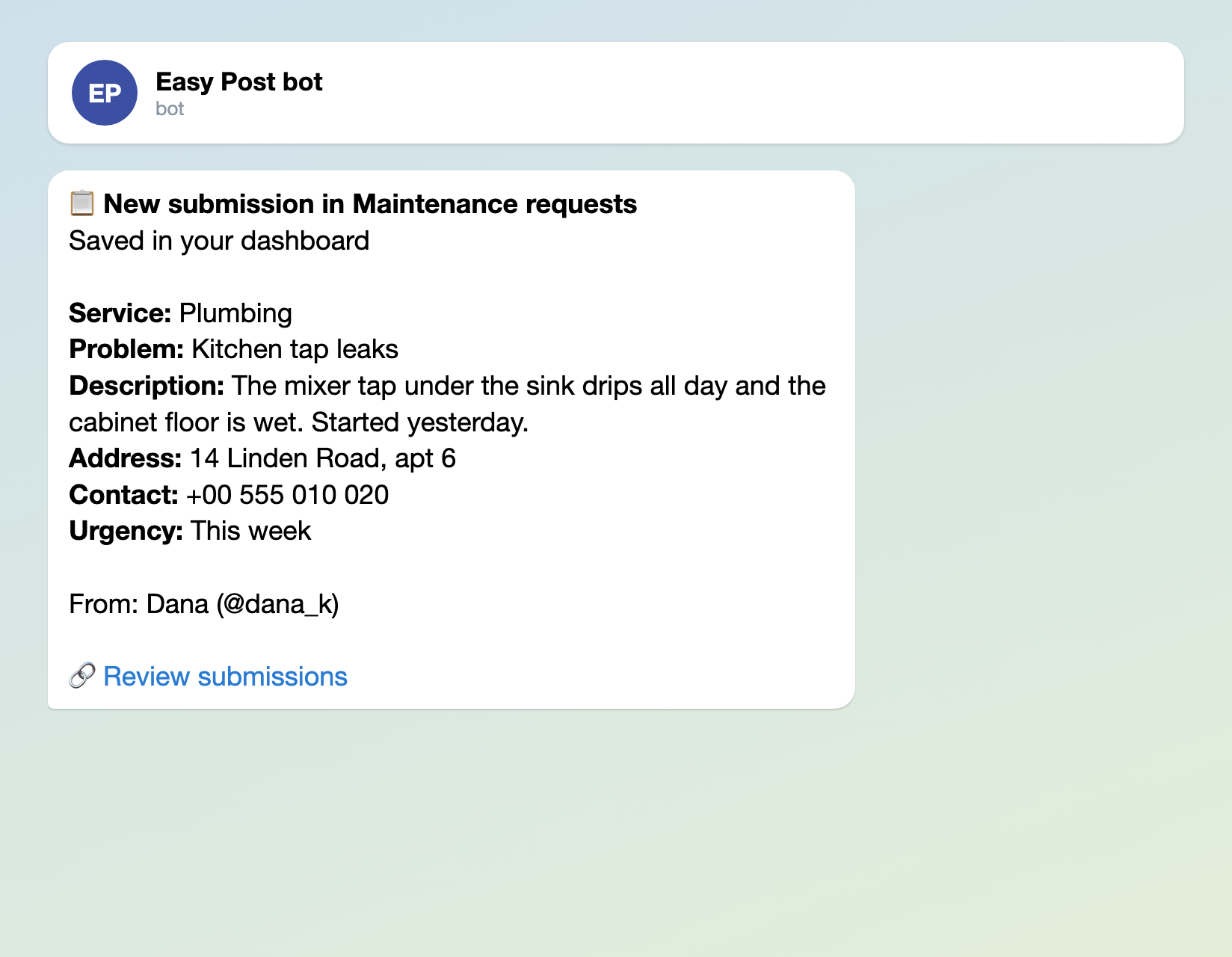
Illustration: the texts are the bot's own, and the card heading is the pipeline's name; names and data are made up.
Nothing waits for you here because no action is switched on: in onboarding you only pick the template, and the pipeline is built at once without a channel. On the pipeline page press "Test the form in Telegram" so the cards can reach you, and leave the channel under "Still to do" empty: a channel would publish your tenants' addresses and phone numbers. The card heading carries the "Channel Name" of the pipeline, which starts as "Construction & Repair": change it on the pipeline's Edit page, for example to "Maintenance requests". The setup is the same as in the bug report form, which also takes photos.
Two texts to paste into the settings
"Welcome Text" in Form Settings is the first message; the default is "Welcome! Press the button to submit your entry." Say there what the form is for, and where an emergency goes. On some plans Easy Post adds a "Powered by" line under it. "Completion Text" is what the bot sends after the last answer; the default is "Thank you! Your submission is awaiting review." Nobody reviews anything in this setup, so replace it too. Telegram HTML tags such as <b> work in both, and a stray "<" or "&" in the text can make Telegram drop all the formatting from that message.
Report a problem in your building: a few short questions and, if you can, a photo. For a flood, a gas smell or no power, call +00 000 000 000 instead.
Request received. We will call you within one working day. Flood, gas smell or no power? Do not wait: call +00 000 000 000.
Replace the number in both texts with your own, and write only the deadline you will keep. Under the thank-you the bot shows a "Submit another" button, which starts a new request. You can rename it in the "Add More Button Text" box, but you cannot switch it off.

Illustration: the text is the one pasted above; names and data are made up.
Give the caretaker the cards too
A superintendent or a technician can read the same cards. Add them under Members: each needs an Easy Post account and a linked Telegram ("Link Telegram" under "Still to do" after your own test, or in their profile). Members can also change the form, so add only people you would trust with it.
Where a request gets stuck
- The limit was set for contractors, not tenants. The template allows 3 starts a day and 10 a month per Telegram account, and the day is counted by the server's clock, not the tenant's. Every press of Start counts, even for a request the tenant drops. A tenant with a bad week, or a caretaker who reports for several flats from one account, meets "Daily limit of 3 submissions reached. Try again tomorrow!" Raise both numbers under "Submission Limits" in Form Settings.
- A half-finished request gives you no card. The Telegram card appears only after the last answer. The partial answers sit under a "Pending" tab in the dashboard, which shows only when there is one, so check it now and then. Photos is the only optional question; keep it that way.
- The form does not follow the job. The dashboard keeps every request, newest first, in tabs by status, with no search or filter by field and no "done" state. When a job is finished, tick it off in your own list.
Set it up in four steps
- In onboarding, or "+ New pipeline" if you already have an account (a plan may limit the number of pipelines), pick the Construction & Repair template. Press "Test the form in Telegram" and leave the channel under "Still to do" empty.
- In Form Settings change the questions as above, delete Experience and its line in Post Template, add "Urgency", write your Welcome Text and Completion Text, and raise the limits.
- Send yourself a request with a photo and check the card, the dashboard and the confirmation.
- Press "Copy link" under "Send the form to real people" and put the link where tenants look: a notice in the lobby, the building chat, a pinned message. The row disappears once a real tenant has answered, so save the link elsewhere. The link opens Easy Post's shared bot, so tenants see a bot named after Easy Post, not your brand.
New to bots? How to create a Telegram bot without code shows how to make one.