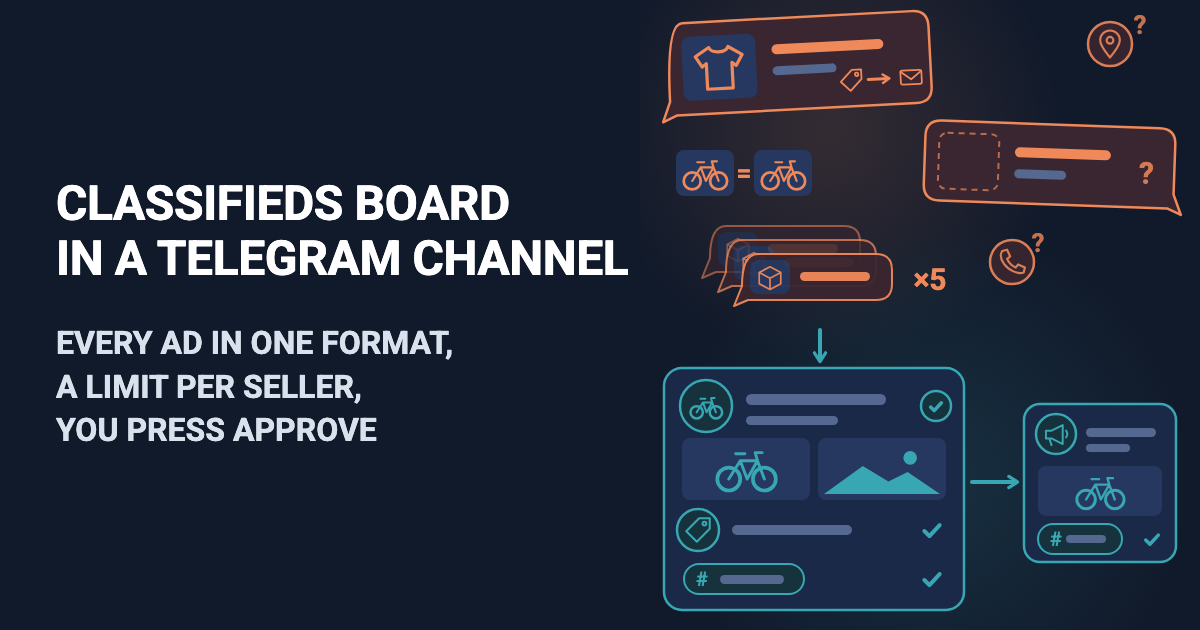
A crocheted bag appears in the comments with no price. Someone asks "how much?" and the maker answers "DM me". The same ring is posted three times this week, and a "handmade" candle has a factory label on it. You chase each maker for a price and a way to buy.
Selling handmade products online in Telegram can happen in a shared channel (a local makers' market, a craft-fair group), and this article is for the person who runs one. Looking for a place to open your own shop? This is not it. Easy Post is a website where you build a form (see the no-code form builder guide). The people who post, called makers here, fill it in inside Telegram, in the shared Easy Post Bot, so you need no bot of your own. Each product reaches you as a Telegram message, the "card", with Approve, Reject, Edit and Delete buttons; Approve puts it in your channel. Easy Post calls a maker's entry a "submission". A maker who posts only in their own channel can write the post by hand; the form would only ask them the same questions each time.
Easy Post is not Etsy: it has no cart, payments, shipping or labels, order tracking, buyer reviews of makers or stock levels, and shoppers find products with Telegram's own search inside the channel. Orders happen through the contact each maker gives. It does not check who posts or whether the goods are handmade. You cannot edit a posted product or mark it "sold" from Easy Post, and a post has no expiry: it stays until you delete it in Telegram. Nothing warns you when the same product comes twice, and every maker, shops included, has the same limit on posts. You cannot block a maker either.
A "sold" mark on a post, a warning about a repeat of the same product and a separate limit for shops are not in the form today. They can be built as an add-on or as custom work on top of it: describe your case on the Easy Post support page.
Where to start
Any button in this article signs you up through Google and opens a first screen with a large "Start with the 'Handmade & Crafts' form" button. Signed up another way? None of the choices on that screen builds this form: press "pick from all ready-made forms" and choose it in the Consumer list. Easy Post then builds a "pipeline", your form with its settings and posts.
If your Telegram is not linked, "Last step: connect Telegram" comes next: scan the QR code (on a phone, press "Connect Telegram") and press Start in Telegram. "Go to the dashboard" opens the pipeline page.
The page on the Telegram channel bot for listings and jobs shows the whole setup. Next, in order: questions, the post, texts, channel, checks, limits, a test.
Selling handmade products online: the questions to ask
Press Form on the pipeline page. In Form Settings each question has a "Bot prompt" box, the text the maker reads; button names go in a box under it, separated by commas. The form asks eight questions: Product Name, Category, Description, Materials, Price, Shipping, Contact and Photos (up to ten). Change these five (paste the texts without the quotation marks) and keep the rest:
Question | Set it to |
|---|---|
Category | Buttons: Jewelry, Clothing, Decor, Art, Toys, Other |
Price | Prompt: "Price with the currency, for example 25 USD. 'DM me' will not do:" |
Shipping | Buttons: Local pickup, Shipping available, Pickup or shipping |
Contact | Prompt: "Your Telegram @username. Everyone will see it:" |
Photos | Prompt: "Send up to 10 photos of the item itself, not catalogue pictures:" |
Category becomes a hashtag in the post, and a hashtag ends at the first space, so the table shortens the default "Home Decor" to "Decor". Price accepts any text, so "DM me" passes; the Number type would refuse it, but only the prompt can ask for a currency. Shipping is only an answer shown in the post; Easy Post arranges no shipping, label or tracking. The table also changes the default "Both" to "Pickup or shipping", because "Shipping: Both" means little to someone who never saw the question.
Materials is optional, with a "Skip" button. A skip stores nothing, so the post gets no Materials line (typing "Skip" skips too). Photos is required, but the bot's "Done" button works before the first photo, so a post can still arrive with none. Leave Contact as it is: it takes typed text, so an @username, a phone number or a link all pass. Press Save at the bottom of the page now: if a later save fails, you lose unsaved question edits.
How a product looks in the channel
By default the post has a labelled line per question ("Product Name: Hand-knitted wool hat") and a Share line, a forwarding link added in a public channel; the photos go above the text (several as an album). The Post Template box under the questions builds it. Keep its last line, the one that reads 📤 Share, and replace everything above it with:
<b>{product_name}</b>
#{category}
Price: {price}
Shipping: {shipping}
Materials: {materials}
{description}
Contact: {contact}
Each word in braces, a token, becomes the maker's answer, and the b tags make the name bold: paste the block as it is. Deleted the Share line? The button Insert a "Share" line under the box puts it back. A skipped Materials drops its whole line, so keep it on its own line. In Telegram, tapping a hashtag searches for it, so shoppers can find the channel's other products in that category.
Under photos Telegram allows 1,024 visible characters. The fixed words of the block above (labels, the # sign, the Share line) take 52 of them, against 88 in the default post. Description stops at 500, which leaves about 470 for the other six answers together. Product Name, Price, Materials and Contact have no limit of their own, though. Easy Post deletes a post with photos that goes over 1,024 when the maker finishes: the maker is told "too long to publish with photos", has to send the product again, and you hear nothing. Only very long answers get there; ask for short ones in the prompts. After Approve, anyone who can open the channel sees the whole post, contact and photos included. Easy Post keeps photo copies at addresses that open without signing in; Reject and Delete leave them.
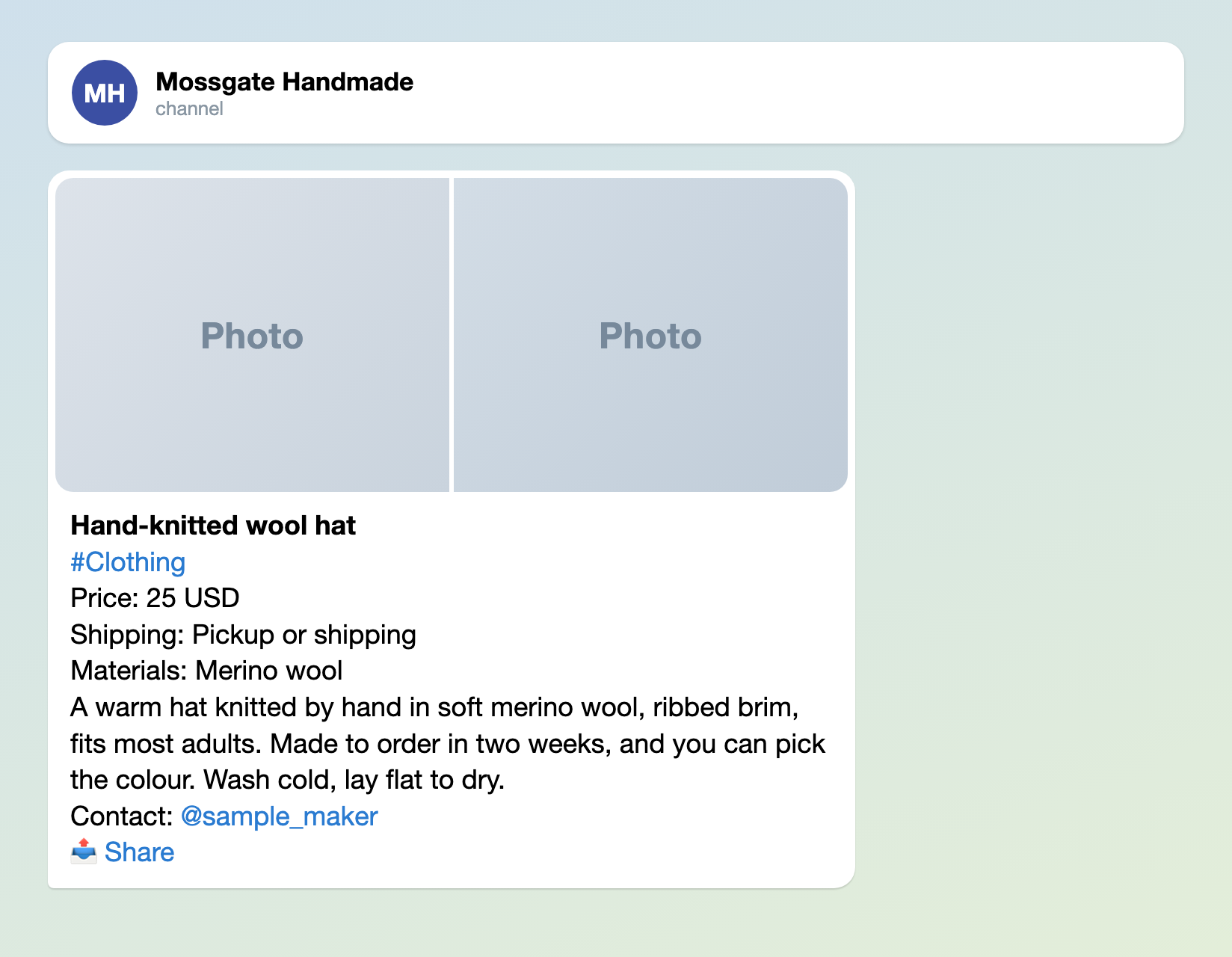
Illustration: the photos are plain tiles; names and data are made up.
The texts makers read
"Welcome Text", under "Bot Messages", is the first message a maker sees. "Approved Message" and "Rejected Message", under "Status Notifications", go to every maker as written; the Approved Message can stay as it is. Swap the sample names for yours.
Welcome Text:
Selling your handmade work in Mossgate Handmade? Answer a few questions and send photos of the item itself. We do not post factory goods. After the admin checks it, your post goes public with the contact you give. When it is sold, write to @sample_admin and we will take the post down.
Rejected Message:
We cannot post this: it may repeat a product already in the channel or break its rules. If neither applies, check the price currency, the photos and the contact, then send it again.
Press Save (either of the two Save buttons saves everything).
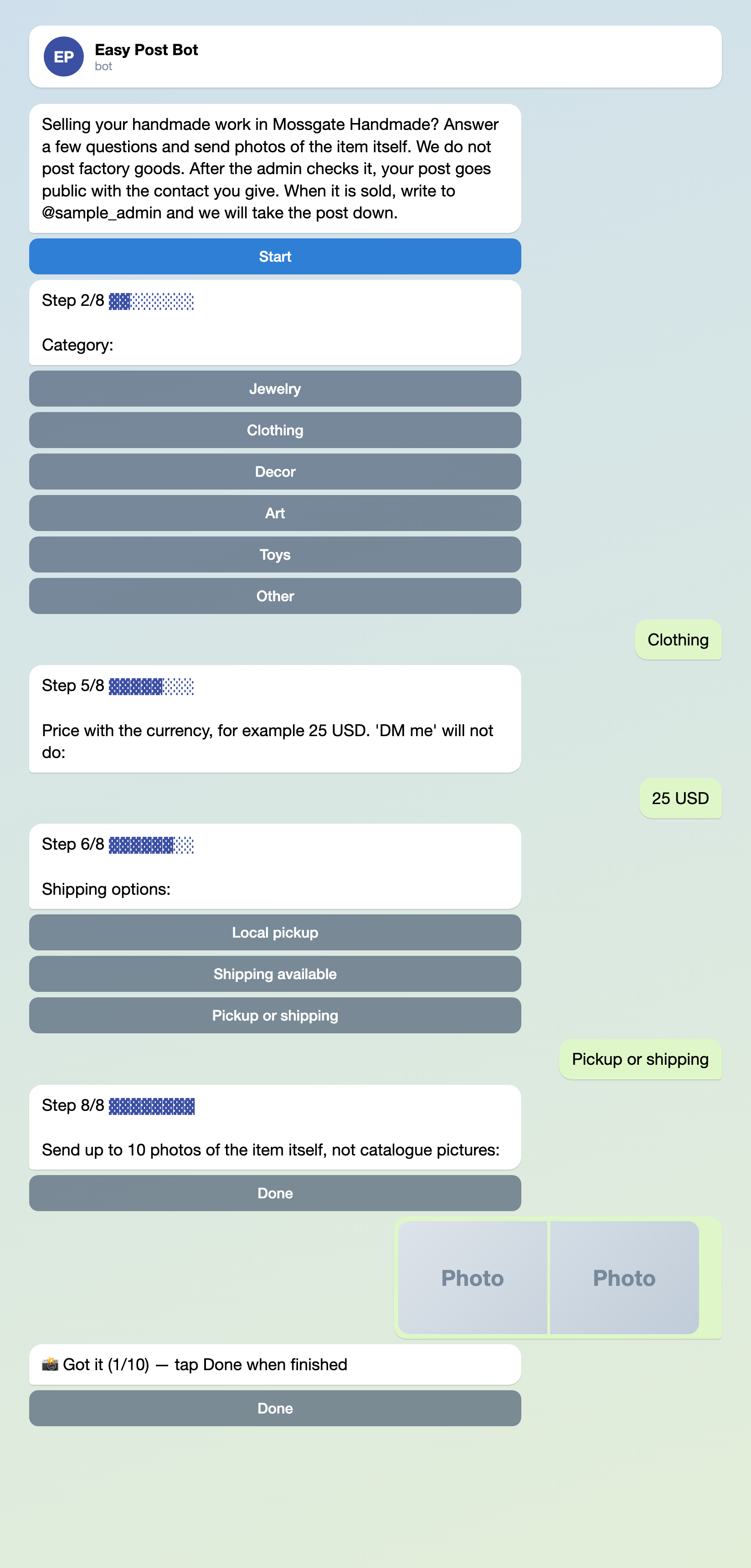
Illustration: some steps are left out; names and data are made up.
Connect your channel: three steps
Approve needs a channel to post to (the classifieds board works the same way).
- On the pipeline page press "Choose a channel in Telegram" in the "Still to do" block; the bot sends a "Choose a channel" button. The page button's link works for 15 minutes.
- Press "Choose a channel" in Telegram, pick your channel and confirm. Telegram lists only channels where you can post; the bot becomes an administrator with one right: posting.
- The bot answers "Done". To check, press "Check that the bot can post" in the "Posting access" row of the pipeline page.
Leave "Auto-approve" unticked (the default): ticked, it posts every submission without your review. It sits under Actions on the pipeline page, then Edit on the row "Publish to Channel". Connect the channel before you share the link with makers: a post that arrives earlier has no Approve button.
Set up your handmade channel →
Before you press Approve
The card shows no photos and cuts each answer at 300 characters; its "Review submissions" link opens the Submissions page, your list of posts on the site, with full answers and thumbnails. The form checks none of the following, so you do:
- Photos. Open them: they should show the item itself, not a catalogue picture. A waiting post without photos shows "Missing: Photos" there; Reject it.
- Price. A number with a currency, not "DM me".
- Contact. A way to reach the maker, such as an @username, and no link in it unless your own rules allow links.
- The goods. Easy Post cannot tell handmade from factory goods or know what your channel bans: you judge by the photos and the description.
- Repeats. The same product posted twice: search the channel for its name. Different products from one maker are not repeats.
Edit opens the submission on the site to fix typed answers such as the price or a typo in the name, but not Category, Shipping or photos: for those, Reject. Approve posts it. The maker gets your Approved Message even if posting failed; you then get "A submission was not published" with the reason (once a day per pipeline at most), so tell the maker yourself. Delete tells the maker nothing and leaves the channel alone.
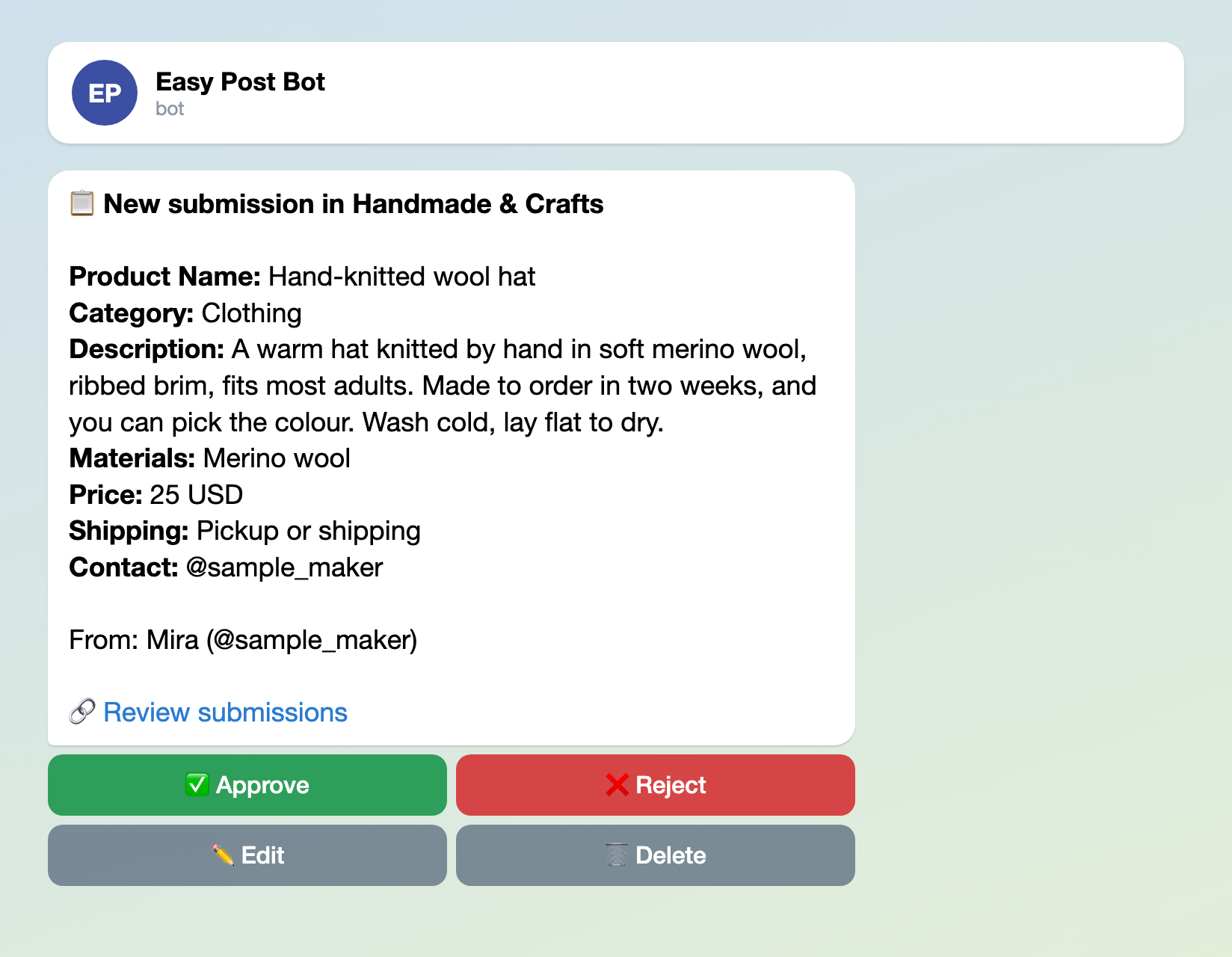
Illustration: the card has no photos; names and data are made up.
Limits and the web page
The form starts with limits of 5 products a day and 15 a month per maker in Telegram. Past a limit the bot replies "Daily limit of 5 submissions reached. Try again tomorrow!" or "Monthly limit of 15 submissions reached.", and you hear nothing. Unfinished and rejected submissions count. A maker with 20 products to list is stopped at the sixth within one day and at the sixteenth within one calendar month, and so is a shop. Set Daily Limit and Monthly Limit under "Submission Limits" in Form Settings (the same for every maker), for example 10 and 60, and press Save. The "Web form" part of "Where people send submissions" (on by default) puts the same questions on a web page that ignores both limits. Switch it off if every maker uses Telegram.
Test it, then share it
Your tests count toward the limits, so raise Daily Limit to 20 and press Save. Press "Open bot" under "Where people send submissions", send yourself a product with photos and press Approve. The post goes to your real channel, so delete it in Telegram at once and set Daily Limit back to the number you chose. "Copy link" on the same part gives the link for makers: put it in your channel description.
A maker who takes custom orders needs a different form for them, the custom order form.
Other forms for similar jobs: classifieds board, order form for a small business and freelance job board. All forms are listed by job in the guide to forms in Telegram.
More articles for channel admins, grouped by job, are listed in Telegram channel bots: what to automate.
New to bots? The guide to creating a Telegram bot without code explains the basics; this form needs no bot of your own.